The LinkedIn Profile Scraper pulls public profile data from any LinkedIn or Sales Navigator URL. It reads the public page directly, so Datablist never needs your LinkedIn credentials.
What you give
LinkedIn Profile URL: e.g. linkedin.com/in/janedoe
Or a Sales Navigator URL: e.g. linkedin.com/sales/lead/xxxx
Nothing else: No name, no company, no login
What you get
Identity & Location: Name, headline, summary, city, state, country
Work History: Up to 10 experiences with titles, dates, and descriptions
Current Company Data: Website, industry, employee range, and description
How it's billed
25 Credits per Profile: Fresh data pulled live from LinkedIn
20 Credits with Cached Profiles: Turn the setting on to cut the rate per row
Charged per Profile: Not per field, however many you return
Calculator
How much will it cost you?
Tell us how many LinkedIn profiles you need to scrape and we'll show you the cheapest way to get them.
1,000 credits = $1, so each credit costs a tenth of a cent. A profile costs 25 credits for fresh data, or 20 if you allow cached profiles. Unlike pay-per-result enrichments, you are charged for every profile the scraper processes, so clean malformed URLs out of your list before a large run. Plan credits renew every month and reset if unused, so they are sized for steady, ongoing use. Top-up credits never expire and only kick in once your monthly balance runs out, which makes them the better fit for one-off spikes.
The Process
How it Works
Datablist loads each public LinkedIn page, parses it, and writes the fields you picked straight into your collection.
Step 1
Upload your profile URLs
Import a CSV or Excel file with one LinkedIn profile URL per row. Standard profile URLs and Sales Navigator lead URLs both work, and you can mix them in the same column.
Step 2
Datablist reads the public page
Datablist loads and parses each public profile itself. It never asks for your LinkedIn credentials and never acts as your account, which is why running it cannot get your profile restricted.
Step 3
Up to 40 fields land in your list
Choose the outputs you want and Datablist writes them into new columns: name, headline, summary, location, work history, education, and firmographics for the current employer.
Answers to common questions about account safety, billing, and the data you get back.
No. Datablist never connects to your LinkedIn account and never asks for your credentials. The scraper reads the public profile page itself, so there is no session of yours for LinkedIn to rate limit or restrict. This is the main reason teams move off browser extensions and login-based scrapers.
Up to 40 public fields: first, last and full name, headline, summary, city, state, country, and location. On the work side you get the current or last role with its title, description, dates, and location, plus the employer's website, industry, employee range, and description. You can return up to 10 past experiences and up to 5 education entries.
25 credits per profile for fresh data, or 20 credits per profile if you enable Accept cached profiles. At the base rate of $1 per 1,000 credits that is $0.025 per profile, and it drops as you buy larger top-up packages. Use the calculator above to size a plan against your list.
By default Datablist fetches the profile live from LinkedIn, so you get whatever is on the page right now. Enable Accept cached profiles and Datablist will reuse a recent copy when one exists, which is cheaper and faster. Use fresh data when the recency of a job title matters, and cached data for bulk list building.
No. LinkedIn does not expose email addresses on public profiles, so no scraper can read them from the page. Run the Waterfall Email Finder on the same rows afterwards. It accepts a LinkedIn profile URL directly and queries 20+ providers for a verified address.
Yes. Both standard profile URLs and Sales Navigator lead URLs work, and you can mix them in the same column. When you feed it a Sales Navigator URL, the LinkedIn Profile URL Normalized output gives you back the clean public profile URL.
There is no batch limit on the enrichment. The practical ceiling is your credit balance. Preview on the first 10 or 100 rows to check the output mapping, then run on the whole collection.
Yes. The enrichment can update all rows or only the ones with missing values, which makes it a straightforward way to refresh job titles and employers across an ageing CRM export without paying again for rows you already have.
Integrations
Related Enrichments
Pair the LinkedIn Profile Scraper with complementary data tools in Datablist.
Everything you need to configure and run Datablist's LinkedIn Profile Scraper. Includes configuration reference, a step-by-step guide, and answers to common questions.
Easy to Use
Doesn’t Risk Your Account
Fully No-Code
LinkedIn Profile Scraper Documentation
Configuration Reference
Settings
Include LinkedIn Internal ID (URN)
Checkbox
Return the internal LinkedIn identifier, used to build Sales Navigator URLs
Include Pictures
Checkbox
Return the profile picture and company logo URLs. These links expire quickly
Accept cached profiles
Checkbox
Reuse a recent copy of the profile when one exists. Drops the cost to 20 credits
Experiences to return
Text
How many work experiences to return: 3, 5, or 10. Defaults to 3
Educations to return
Text
How many education entries to return: 1, 3, or 5. Defaults to 1
Inputs
Person's LinkedIn Profile
Text
The profile URL. Works with linkedin.com/in/xxx and Sales Navigator lead URLs
Outputs
LinkedIn Profile URL Normalized
Url
The clean public profile URL, in the format linkedin.com/in/xxx
First Name / Last Name / Full Name
Text
The name on the profile, split and combined
Headline
Text
The tagline shown under the name on the profile
Summary
Text
The longer About blurb written by the person
City / State / Country / Country Name
Text
Location fields, with the country as a 2-letter ISO code and in words
Location
Text
The full location string as shown on the profile
Title (Current or last experience)
Text
Job title of the current or most recent role
Description (Current or last experience)
Text
The role description, where the profile has one
Start Date / End date (Current or last)
Date
Role dates. The end date is empty while the role is still active
Company Name (Current or last experience)
Text
Employer name on the current or most recent role
Company page URL / website
Text
The employer's LinkedIn page and its own website
Company description / industry / employee range
Text
Firmographics for the current employer, e.g. 11-50
Title, dates and company (Experience #2 to #10)
Text
Past roles, up to the number set in Experiences to return
Education entries
Text
School, degree, and dates, up to the number set in Educations to return
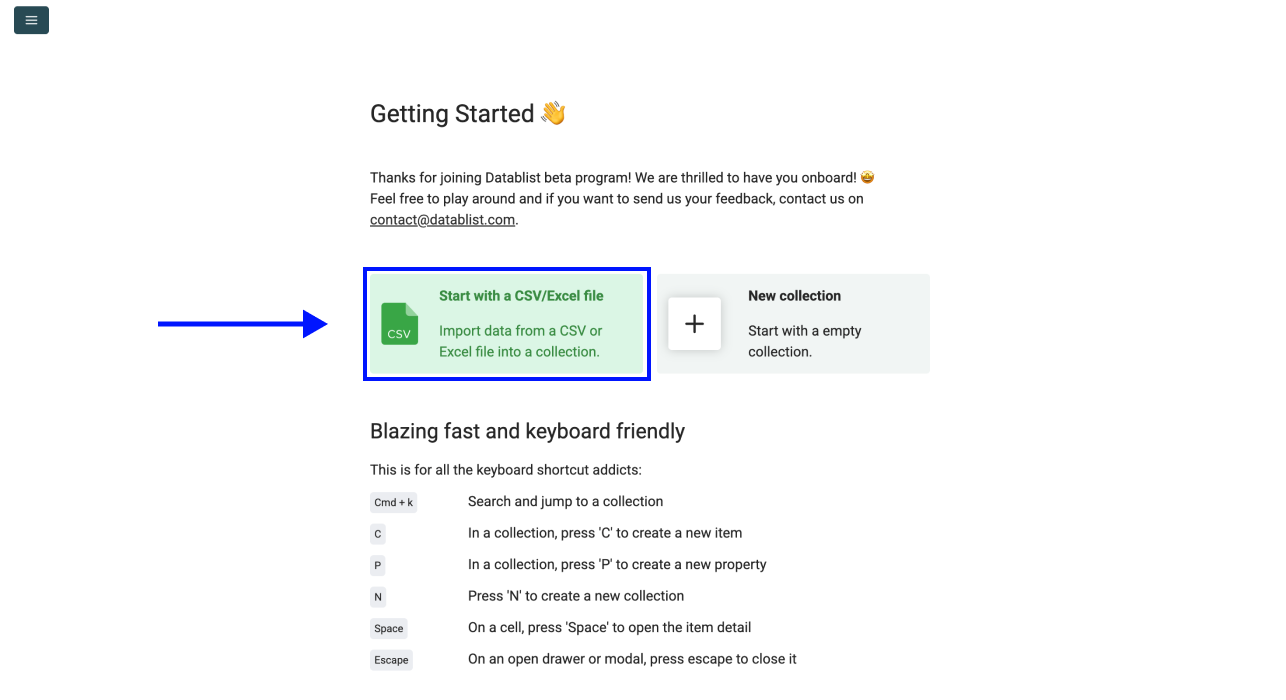
2. Upload your CSV or Excel file containing LinkedIn profile URLs
Step 2: Navigate to the Enrichment
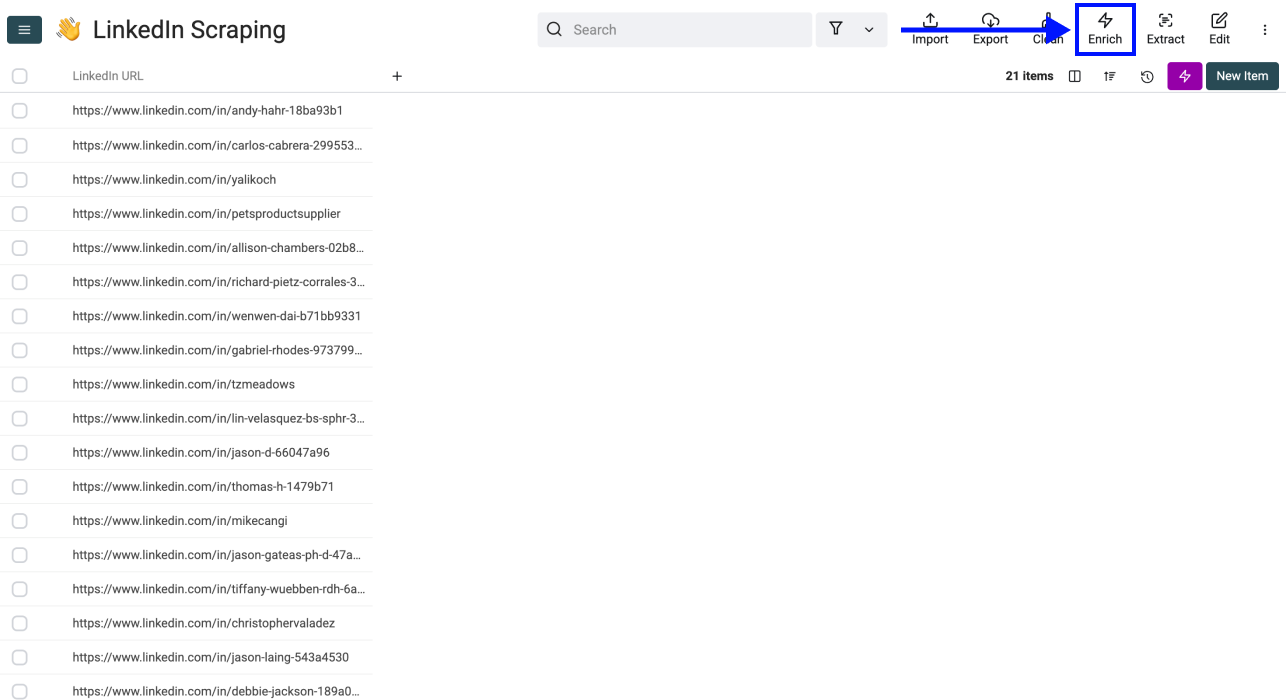
1. Click on Enrich in the top menu
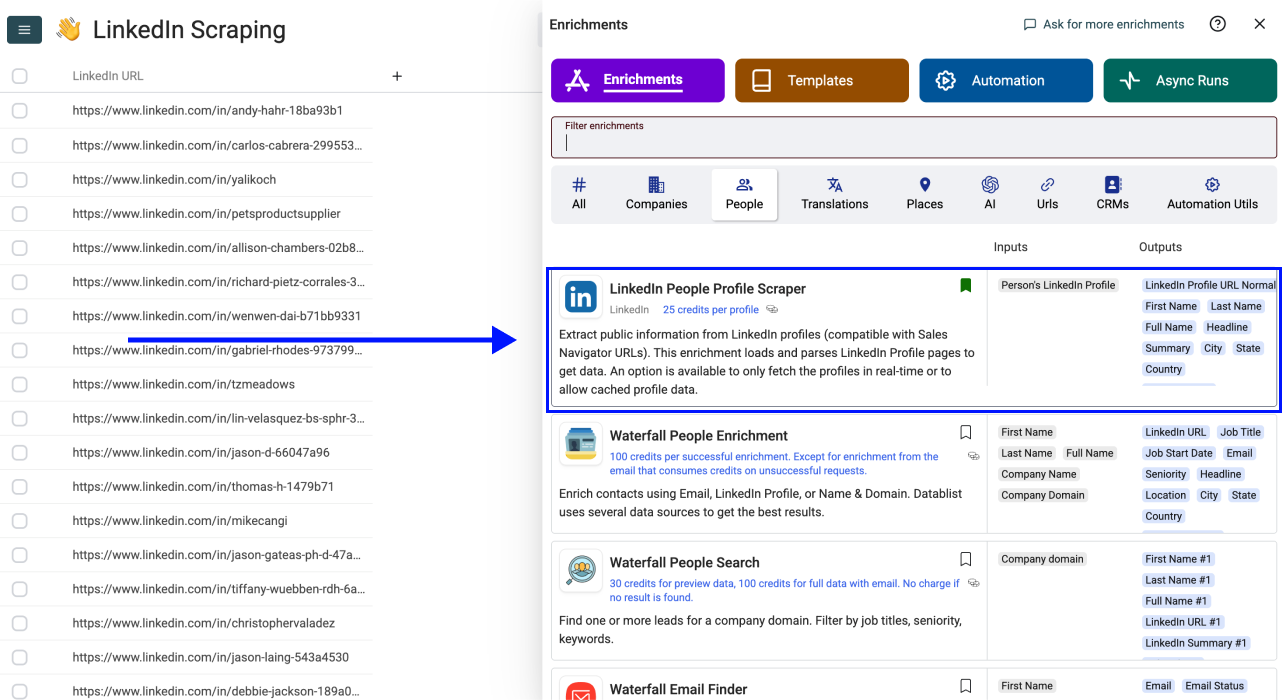
2. Go to the People section and select LinkedIn Profile Scraper
Step 3: Set Up the Enrichment
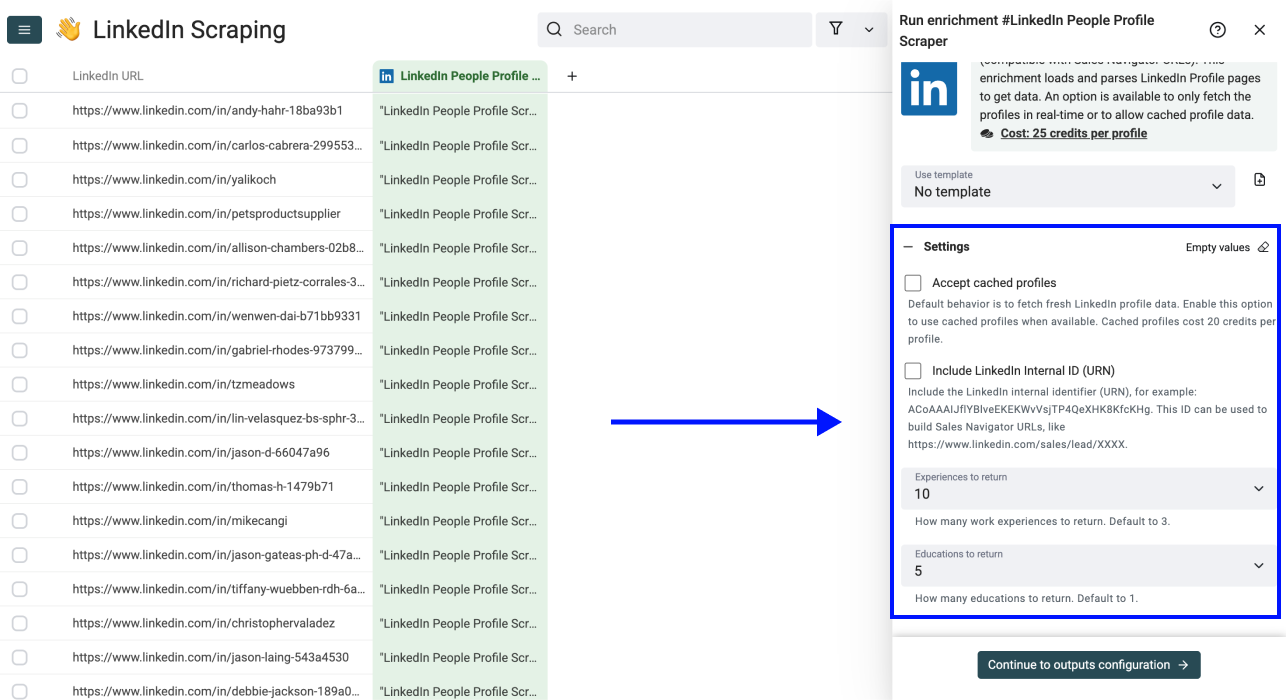
Once you select the LinkedIn Profile Scraper, a drawer opens with settings. You'll see the following options:
• Accept Cached Profiles (if available): Default behavior scrapes fresh LinkedIn profile data. Enable this to use cached profiles when available. Cached profiles cost 20 credits instead of 25.
• Include LinkedIn Internal ID (URN): Returns the LinkedIn internal identifier (e.g. ACoAAAIJflYBlveEKEKWvVsjTP4QeXHK8KfcKHg). Useful for building Sales Navigator URLs.
• Experiences to return: Choose how many work experiences to scrape (3, 5, or 10).
• Educations to return: Choose how many education records to scrape (1, 3, or 5).
Step 4: Configure Your Inputs
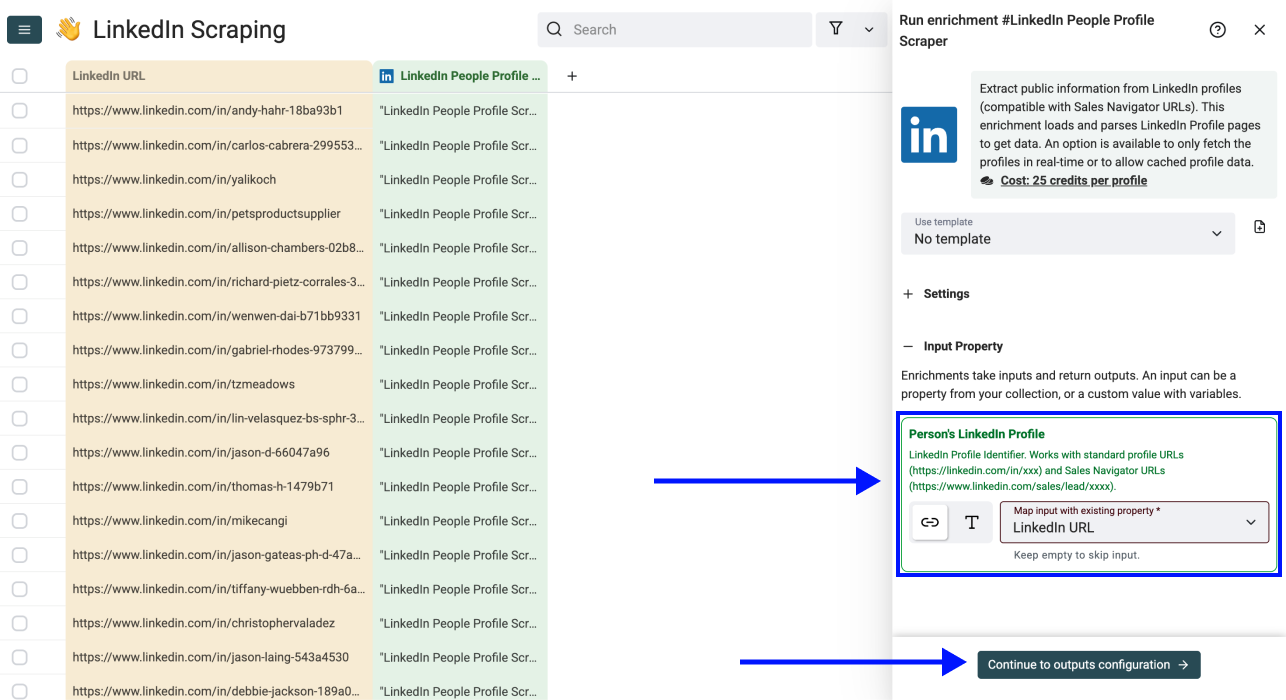
Once you've configured your settings, scroll down and map the column with your LinkedIn profile URLs as Input Property.
Click Continue to Outputs Configuration when ready.
Step 5: Select Outputs
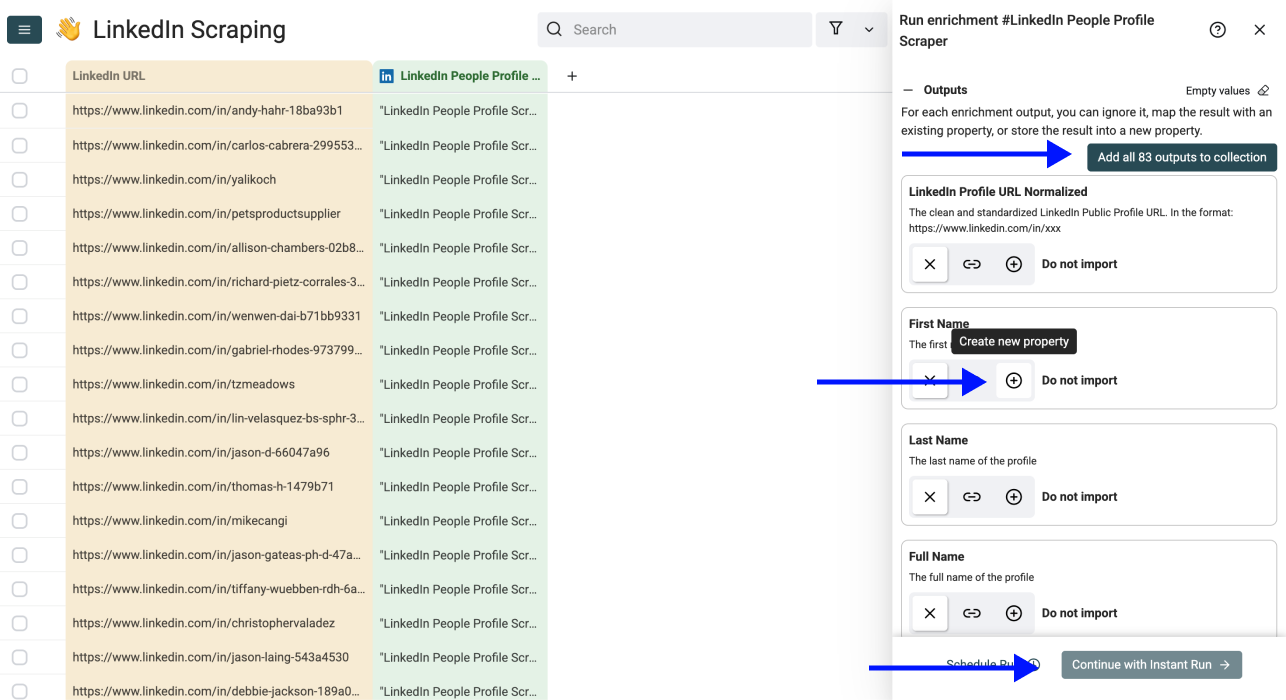
Configure where the scraped data will be stored. You can map output fields to existing columns or create new ones.
Click the ⊕ icons to add outputs to your collection. Alternatively, you can also use the shortcut to add all columns with one click.
Then click Continue with Instant Run to continue.
Step 6: Run the Enrichment
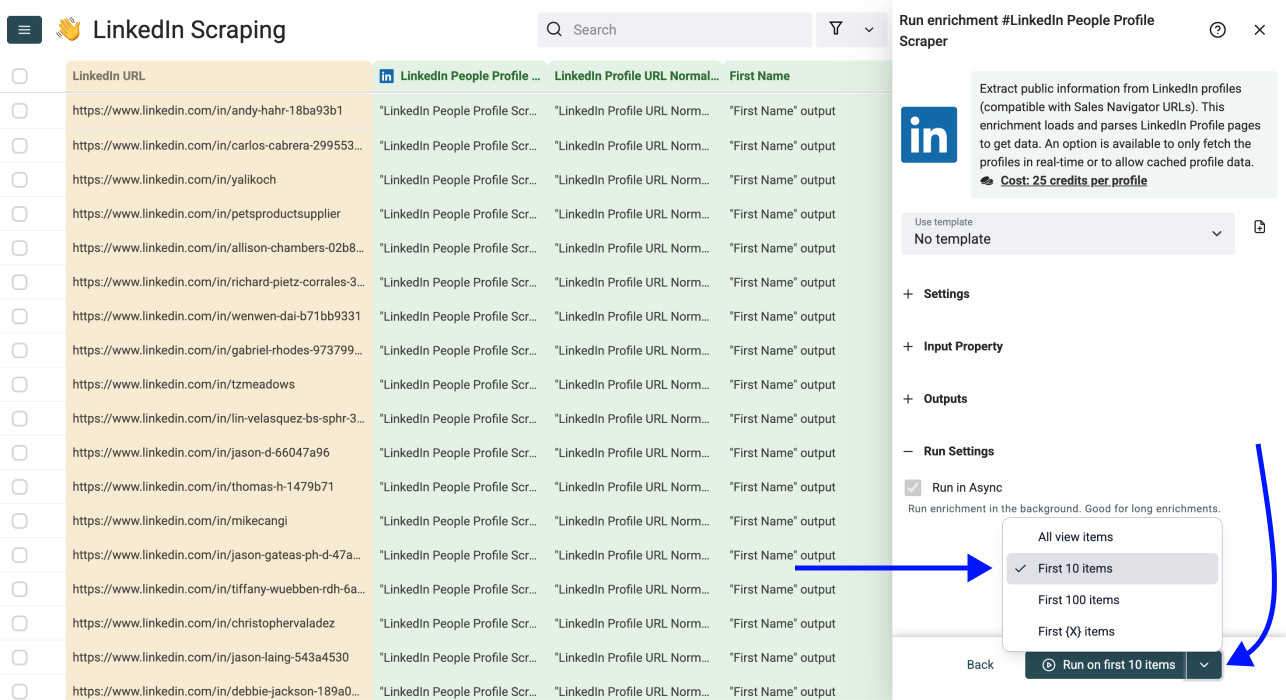
Now you can choose your run settings:
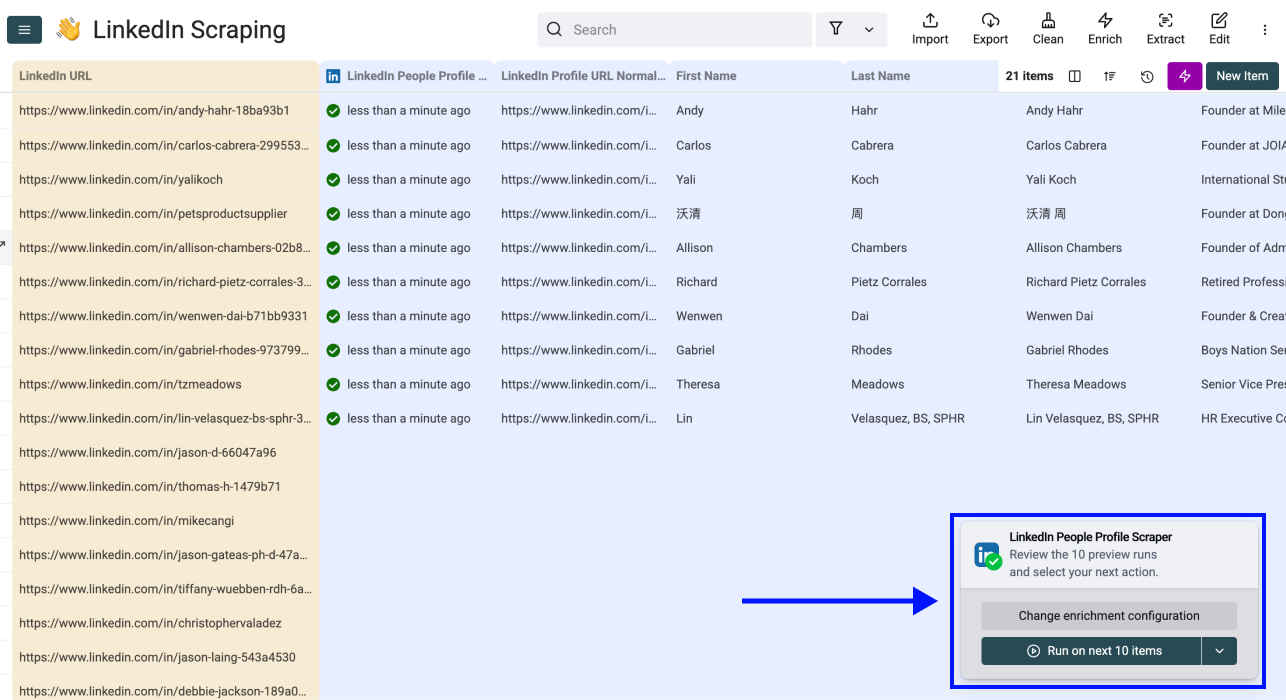
• Run on first 10 items: Test before committing
• Run on first 100 items: Validate larger samples
• Run on all view items: Process your entire list
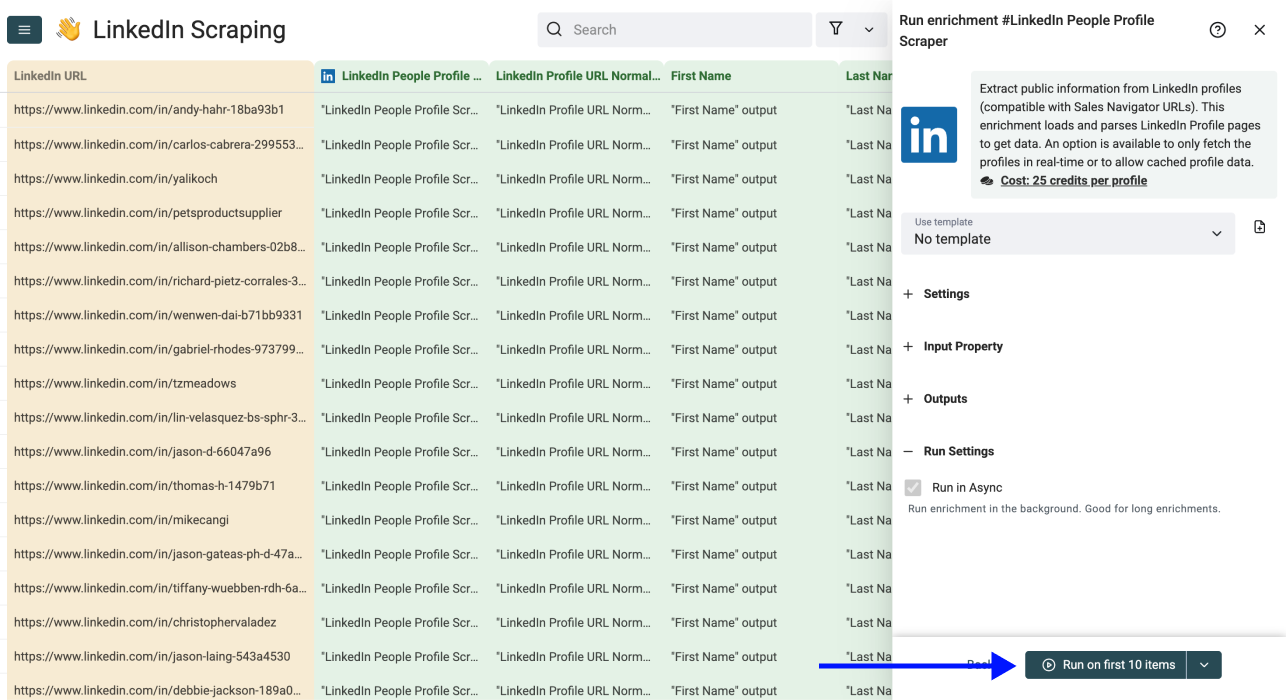
Click Run on first 10 items and watch your data populate automatically.
Now you can review your results and continue the enrichment.
Stop Doing Manually
What Datablist Can Do in Seconds
Give Datablist a try and see how easy workflow automation can be. 38,000+ users are already experiencing it!
One column holding the LinkedIn profile URL. Both linkedin.com/in/xxx and Sales Navigator lead URLs are accepted, and they can be mixed in the same column. No name, company, or login is required.
Set Experiences to return to 5 or 10 in the settings. Note that only the current or most recent role comes with full company data. Earlier roles return the job title, company name, and start and end dates.
Enable Include LinkedIn Internal ID (URN). It returns the internal identifier, for example ACoAAAIJflYBlveEKEKWvVsjTP4QeXHK8KfcKHg, which you can use to build a Sales Navigator URL in the form linkedin.com/sales/lead/XXXX.
LinkedIn image URLs are signed and expire quickly. Enable Include Pictures if you need them, but download the images to your own storage soon after the run rather than storing the link.
Keep the status output column. Filter your view to the rows that did not succeed, fix or remove malformed URLs, then choose Run on all view items. Only the rows in the filtered view are processed.
No. The field set is the same. The difference is recency: a cached profile reflects the page as of when it was last fetched rather than right now. It costs 20 credits per profile instead of 25.
Yes, on the Growth plan and above. Automation lets you run the enrichment on a schedule or on a trigger, so profile URLs landing in a collection get scraped without anyone opening the app.
The Waterfall Email Finder is the usual next step, since it accepts a LinkedIn profile URL and returns a verified email. The Waterfall Phone Finder works from the same input for mobile numbers.